Creating an invoice: options, required fields and formats
E-Invoice > Create Invoice offers four ways to produce the same document. Which one you pick changes the effort, not the result.
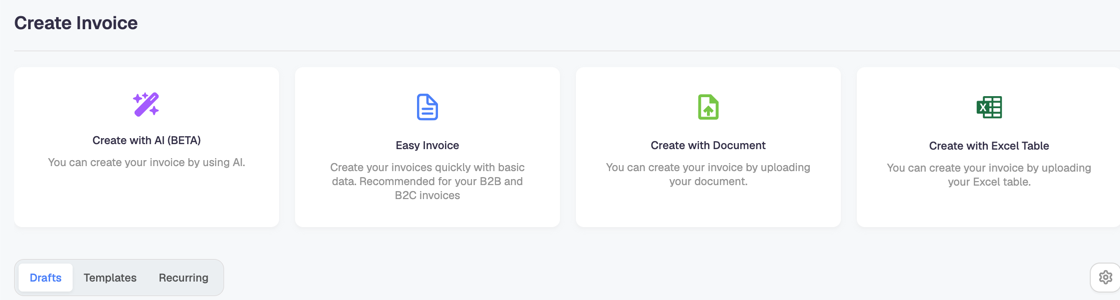
| Option | Use it when |
|---|---|
| Easy Invoice | You type a few lines by hand. Suited to B2B and B2C invoices. |
| Create with Document | You already have the invoice as a file and want the platform to read it. |
| Create with Excel Table | You issue many invoices from a spreadsheet. |
| Create with AI (BETA) | You want the content extracted for you. Being a beta, check the result before sending. |
Below the cards, three tabs hold work in progress: Drafts are invoices you started and did not send, Templates are reusable skeletons, and Recurring are invoices the platform issues on a schedule.
The first dialog: partner and business model
Easy Invoice starts by asking what kind of invoice this is.

Business Model is required, and it drives everything that follows:
- Business to Business (B2B) — an invoice to another company.
- Business to Consumer (B2C) — an invoice to a private individual.
- Business to Government (B2G) — an invoice to a public entity, which travels through Chorus Pro.
Partner picks the customer from your partner list. Choosing one fills the buyer's identifiers for you, which is why keeping partners up to date saves work later.
Which formats you can use
The format is not a free choice; it follows from who the buyer is.
| Buyer | Formats available |
|---|---|
| French company with a SIREN, SIRET or French VAT number | The French profiles — UBL CIUS, CII CIUS and Factur-X EN 16931 — plus Peppol BIS 3.0.19 and PDF |
| Private individual, with no French tax identifier (B2C) | Peppol BIS 3.0.19 and PDF only |
| Company outside France (B2B international) | Peppol BIS 3.0.19 and PDF only |
This matters beyond formatting: lifecycle statuses exist only on French UBL, CII and Factur-X invoices. A Peppol BIS invoice to a foreign buyer will never show a cycle de vie, and that is correct rather than a fault.
The Factur-X BASIC WL profile carries no invoice lines at all. If you choose it, enter the document totals and the VAT breakdown per rate by hand — the line table is not part of that profile.
The required-field rules that surprise people
The red asterisk marks a field the format requires, and a few of these rules are conditional, which is why an invoice can still report a missing field after you filled everything you can see.
A buyer reference or an order reference is required — one of the two. If Buyer Reference is empty, then Order Reference / Sales Order becomes required, and the other way round. Filling either one clears both warnings.
Sales Order Reference alone is not the same as a purchase order. If you enter a Sales Order Reference without a Purchase Order Reference, the Peppol document goes out with NA in the purchase order field. That is valid, but if your customer matches invoices against their PO number, they will not find it — ask them for the PO and enter it.
B2G invoices are stricter, because Chorus Pro validates them: the buyer's SIRET is mandatory and must be 14 digits, and the invoice number is limited to 20 characters using only A-Z, a-z, 0-9, -, +, _ and /.
Some legal mentions are mandatory on French invoices. When the platform asks for a legal note, it is a requirement of French invoicing law, not a Docnova field.
For services taxed on invoicing (option pour les débits), the date on which VAT becomes due has to be stated.
"I filled everything and it still says a field is required"
Work through it in this order:
- Read which field the message names — it is often a field further down the form, or one inside a collapsed section, not the field you are looking at.
- Check the conditional pairs above: buyer reference against order reference is the usual culprit.
- Check the buyer. A missing buyer identifier restricts the format, and the format then requires fields the form did not ask for at the start. Completing the partner record often removes several warnings at once.
- If a field you cannot see is being demanded — a phone number, for instance — complete your own company's contact details in Company Settings, since the format also carries the seller's data.
Still blocked: send support the invoice number, the business model and the exact message. The rule that fires is in the format, so the message text identifies it precisely.