Company history
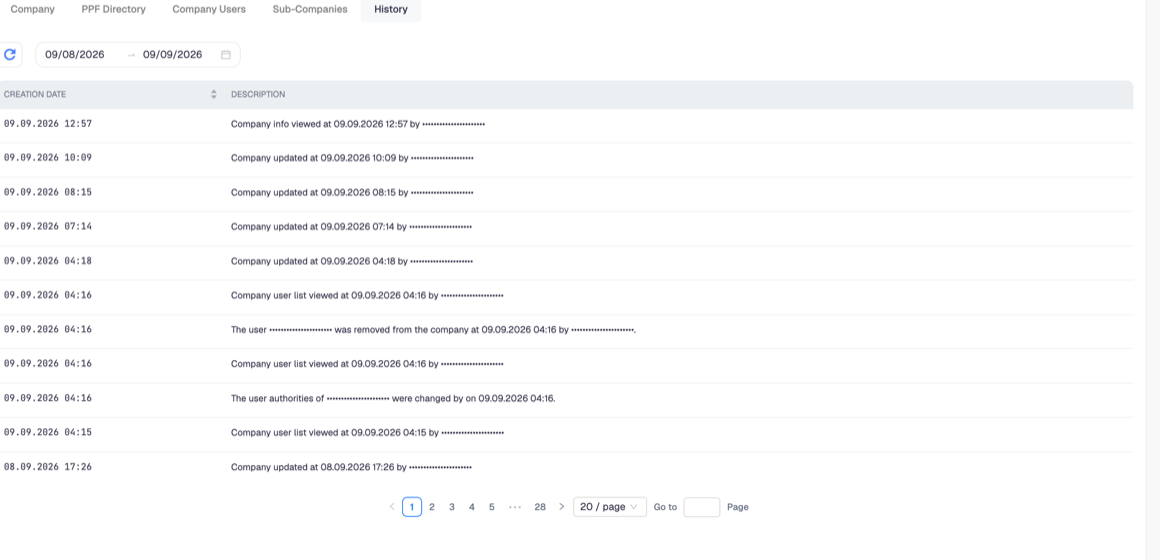
Company Settings > History is the audit trail of the company. Every entry names what happened, when, and which user did it.
What it records
Changes, and also views. Entries you will see include:
- the company being updated, and by whom;
- the company information being viewed;
- the user list being viewed;
- a user being added to or removed from the company;
- a user's permissions being changed;
- sub-company creation.
Recording reads as well as writes is deliberate: for a question like "who looked at our company data last week", a log of changes alone would answer nothing.
The list is filtered by a date range and paginated, so the absence of an entry on the first page is not evidence that it never happened — widen the range first.
What it is good for
Explaining an unexpected change. When a setting is not what you left it as, the history names the user and the minute. That is usually the end of the investigation.
Reviewing access after someone leaves. Removing a user does not remove their entries; what they did stays attributable, which is the point of an audit trail.
Answering an auditor. For company-level data, this is the evidence that changes are attributable to named users.
What it does not contain
It is a company log, not an invoice log. Invoice events — sent, received, notes, status changes — live on the invoice itself, and the French lifecycle is on the Lifecycle (CDV) tab. Login events appear in the dashboard's own history overview rather than here.
Entries cannot be edited or deleted from the interface, by design.