Document Archive
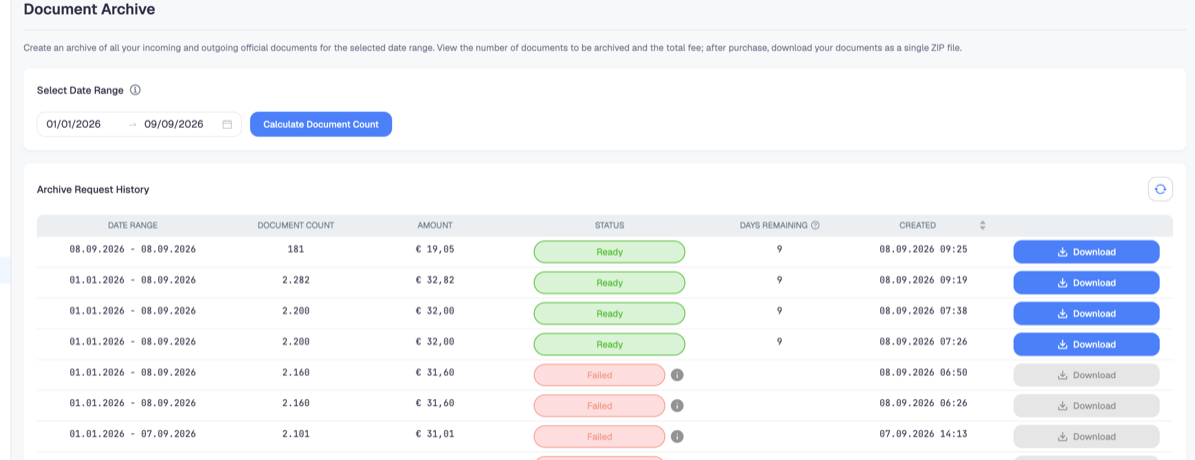
The archive packages your incoming and outgoing documents for a date range into a single ZIP file you download. Unlike the other reports it produces files rather than figures, and it is charged per document, so it is worth understanding before you click.
How it works
- Pick a date range.
- Click Calculate Document Count. The platform counts the documents in that range and shows the fee before anything is charged.
- Confirm to purchase. The archive is then prepared in the background.
- When the row reaches Ready, use Download to take the ZIP file.
Counting is free; only the purchase is charged. Use the count to check a range before you commit to it — a range that accidentally covers two years costs accordingly.
The request history
Every request stays in Archive Request History with its range, document count, amount, status, days remaining and creation time.
| Status | What it means |
|---|---|
| Ready | The ZIP is prepared and the Download button works |
| Failed | Preparation did not complete; the row carries a reason |
| Neither | Still being prepared — the button stays disabled |
Days remaining is the important column. A prepared archive is kept for a limited period and then removed, so download it and store it where your records live. When the days run out you have to request — and pay for — the archive again.
A failed row is worth reporting rather than retrying blindly: repeated failures on the same range usually mean one document in it cannot be packaged, and support can identify which.
When you actually need it
An audit or a tax inspection. Auditors ask for the documents themselves, not a report of them.
Leaving the platform. Take the archive before you close the account. A deleted company takes its documents with it, and the archive is the only way to keep them in a form you hold yourself.
A period closing. Some accountants want the source documents alongside the ledger for each closed year.
For day-to-day work you do not need it: individual invoices download as PDF or XML from the invoice screens at no cost.
The archive covers what is in Docnova. Documents that never reached the platform — invoices issued elsewhere, or ones that failed processing — are not in it. Check the Document Report for failures before archiving a period you intend to rely on.