Which report answers which question
The Reports section holds nine screens. They overlap on purpose — each one answers a different question from the same invoice data — so the fastest way to use them is to start from your question rather than from the menu.
| Your question | Report |
|---|---|
| How much VAT do I owe or reclaim this period? | VAT Report |
| Who owes me, and whom do I owe? | Monthly AR & AP Report |
| Did I earn more than I spent this month? | Monthly Income & Expense Report |
| How much of what I invoiced has actually been paid? | Paid Invoices Breakdown |
| Where is one specific document, and did it go through? | Document Report |
| What is my overall position right now? | Financial Overview |
| I need my documents as files for an audit | Document Archive |
| What do my bank accounts say? | Banking Overview (Beta) |
| What will my cash look like? | Cash Flow (Beta) |
VAT Report
Four totals for the selected period — VAT on sales invoices, VAT on purchase invoices, VAT on expense receipts, and the net balance between them — then the same figures month by month.
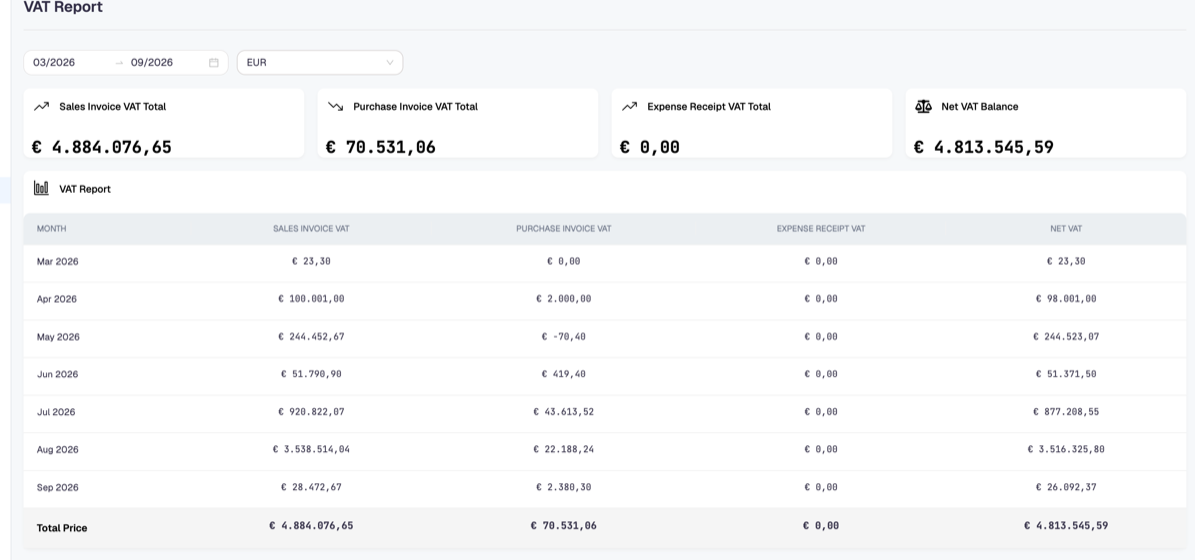
The net figure is the difference, not a declaration. It tells you what the invoices in Docnova add up to; your accountant still decides what goes on the return, because a VAT return also carries items that never became an invoice here.
The month a figure lands in follows the invoice date, so an invoice registered late still counts in its own month. That is what makes a closed month change slightly after you register a backdated invoice — the report is right, the earlier print-out is stale.
Monthly AR & AP Report
Accounts receivable against accounts payable: what customers still owe you, what you still owe suppliers, and the net position, with a chart per month. Use it to see whether a month is heavy on collection or on payment.
Monthly Income & Expense Report
Invoice income, invoice expense, receipt expense and the net per month, with a profit-and-loss indicator. Where the AR & AP report is about outstanding amounts, this one is about what was invoiced in the month regardless of payment.
Paid Invoices Breakdown
The same amounts split by whether they have been settled: invoiced income against outstanding receivable, invoiced expense against outstanding payable. This is the report that shows collection performance rather than sales.
Document Report
One row per document that passed through the platform, with its tracking identifier, direction, document type, status and the file or invoice number.
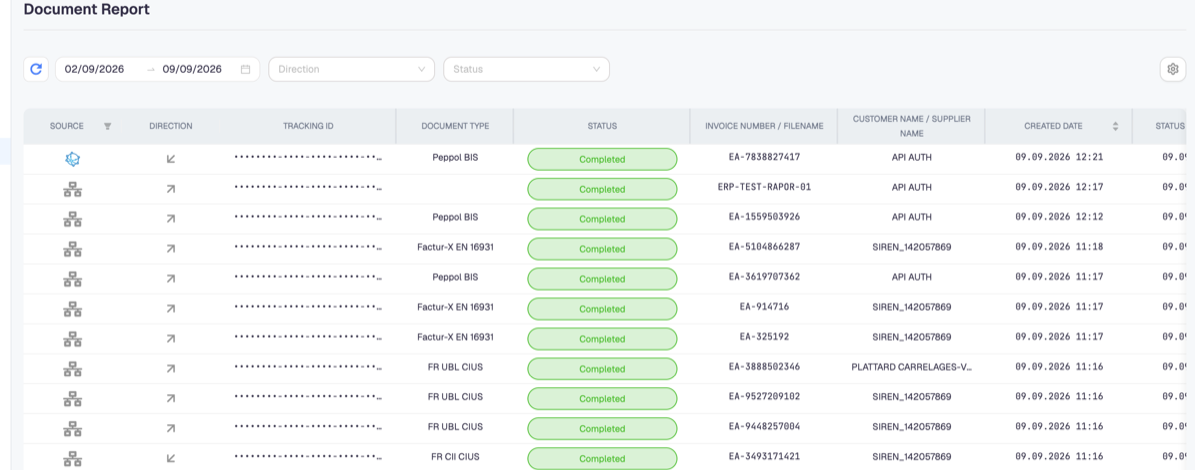
This is the screen to open when an invoice is missing from the invoice list. A document reaches one of these states:
| Status | Meaning |
|---|---|
| Pending | Accepted, not processed yet |
| Processing | Being processed now |
| Completed | Processed successfully — the invoice exists |
| Failed | Processing failed and may be retried |
| Sending failed | Processed, but the send did not succeed |
| Permanent failed | Given up; it will not be retried |
A document that is Completed but absent from Sales Invoice or Purchases Invoice is a filter problem — check the date range and the selected company. Anything ending in failed is a document problem, and the tracking identifier is what support needs.
Financial Overview
Income, expense, receipt expense and net for the period, with the income–expense and VAT distributions as percentages. It is the summary screen, not a reporting document.
Banking Overview and Cash Flow
Both are marked Beta and both need a bank connection. Without one they show an empty state pointing at Bank Accounts — nothing is broken, there is simply no bank data to read yet.
Document Archive
Separate from the reports above, because it produces files rather than figures, and it is charged per document. See Document Archive.